
Laptop Deals for Students 2026: How to Upgrade Your Study Setup in Nigeria
Estimated reading time: 10 minutes
About This Article
This article was prepared by the ELEXBIG Editorial Team.
Our team closely follows the latest laptop trends, student technology needs, and digital learning tools to help Nigerian students make smart buying decisions. By combining expert insights with real-world usage needs, we provide practical guidance on choosing affordable, high-performance laptops that improve learning, productivity, and everyday academic life.
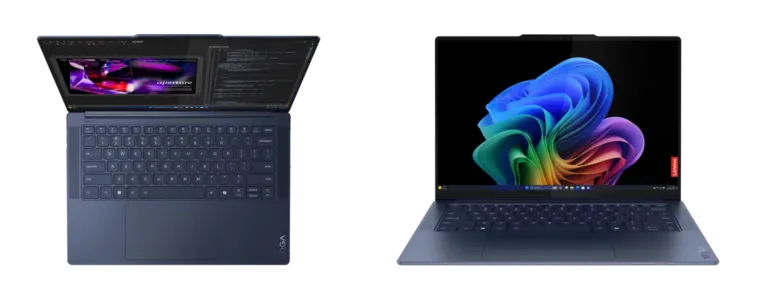
The cost of education continues to rise, and for many Nigerian students, investing in the right laptop has become just as important as paying tuition or buying textbooks. Whether you're studying at the University of Lagos, Ahmadu Bello University, the University of Nigeria, Nsukka, Covenant University, or any other tertiary institution, having a reliable computer can significantly improve your learning experience.
Fortunately, 2026 presents excellent opportunities to upgrade your study setup without overspending. Seasonal promotions, back-to-school offers, and mid-year sales make it easier for students to buy quality laptops, tablets, monitors, and other study accessories at more affordable prices.
However, buying the cheapest laptop isn't always the smartest decision. The right device depends on your course of study, your daily workload, and how long you expect the laptop to last.
In this guide, you'll discover how Nigerian students can choose the best laptop, avoid common buying mistakes, and build a productive study setup that fits almost any budget.
Key Takeaways
- Buy a laptop based on your course requirements, not just the price.
- Set a realistic budget before shopping.
- Compare specifications instead of focusing only on brands.
- Consider accessories that improve productivity, including monitors and tablets.
- Shop from trusted electronics stores with genuine products and warranty support.
- Think long-term—a slightly higher investment today can save money on repairs and replacements later.
Why Every Nigerian Student Needs a Good Laptop in 2026
Gone are the days when students only needed notebooks and textbooks.
Today, almost every aspect of university education requires digital tools. Assignments are submitted online, lectures are recorded digitally, research materials are available on the internet, and many lecturers now communicate through online learning platforms.
A dependable laptop helps students:
- Attend virtual lectures
- Complete assignments faster
- Conduct academic research
- Create presentations
- Learn new digital skills
- Participate in online certification courses
- Build freelance careers while studying
Many Nigerian students also earn extra income through freelancing, graphic design, programming, video editing, social media management, and virtual assistance. These opportunities require a capable laptop that can handle multitasking efficiently.
Instead of viewing a laptop as an expense, it's better to see it as an investment in your education and future career.
Why 2026 Is a Great Year to Upgrade Your Study Setup
Technology changes rapidly.
If your laptop is more than five years old, chances are it's slower than modern applications require. You may experience:
- Slow boot times
- Frequent freezing
- Battery problems
- Limited storage
- Difficulty running multiple applications
- Compatibility issues with modern software
Upgrading now means you'll enjoy:
- Faster performance
- Better battery life
- Improved security
- Higher productivity
- Less frustration during assignments
Many retailers also introduce competitive discounts during seasonal sales, making 2026 an excellent time to upgrade without stretching your finances.
Start With Your Budget Before Shopping
One of the biggest mistakes students make is shopping without a spending limit.
Sales promotions can easily tempt you into buying features you'll never actually use.
Before browsing laptops, ask yourself:
- How much can I comfortably spend?
- Do I need only a laptop?
- Will I also need accessories?
- Can I pay upfront?
- Is it worth waiting for a better promotion?
Having clear answers prevents impulse purchases.
A good approach is to divide your budget into categories.
For example:
| Item | Budget Allocation |
|---|---|
| Laptop | 75% |
| Mouse | 5% |
| Laptop Bag | 5% |
| Accessories | 10% |
| Emergency Balance | 5% |
This helps ensure you don't spend your entire budget on just the laptop while forgetting important accessories.
Identify Your Course Requirements
Not every student needs an expensive computer.
The ideal laptop depends largely on what you study.
Arts, Education and Social Sciences
Students studying English, Political Science, Sociology, History, Mass Communication, Education, or Philosophy generally use applications like:
- Microsoft Word
- PowerPoint
- Excel
- PDF readers
- Browsers
- Video conferencing apps
A reliable entry-level or mid-range laptop is usually enough.
Browse reliable options here:
Laptops:https://elexbig.com/product-categories/laptops
Business and Accounting Students
Business students often work with:
- Excel
- Accounting software
- Statistical tools
- Presentation software
These tasks require a laptop with sufficient RAM and fast storage for smooth multitasking.
Computer Science Students
Programming students need stronger specifications.
You'll likely run:
- Visual Studio Code
- Android Studio
- Docker
- Databases
- Virtual machines
Look for:
- At least 16GB RAM
- SSD storage
- Modern processor
- Good battery life
A faster machine can significantly reduce compile times and improve productivity.
Engineering Students
Engineering software can be demanding.
Applications like:
- AutoCAD
- SolidWorks
- MATLAB
- Revit
require more processing power.
Students in Engineering should prioritise:
- Powerful processors
- Dedicated graphics (where needed)
- Larger RAM capacity
- Expandable storage
Medical Students
Medical students usually need laptops for:
- Online lectures
- Research
- Medical journals
- PDF textbooks
- Presentations
A lightweight laptop with excellent battery life is often the most practical option.
Creative Students
Students studying:
- Architecture
- Multimedia
- Animation
- Video Editing
- Graphic Design
need higher-end laptops capable of handling demanding creative software.
Performance should always take priority over appearance.
Don't Buy Based on Brand Alone
Many buyers make the mistake of choosing a laptop simply because of the logo.
While popular brands have strong reputations, specifications matter far more than branding.
Instead of asking:
"Which brand is best?"
Ask:
- Which processor does it use?
- How much RAM does it have?
- Is the storage SSD?
- Can it be upgraded later?
- Does it have good battery life?
These questions have a much bigger impact on your day-to-day experience than the brand name alone.
SSD vs HDD: One Decision That Changes Everything
If your budget allows, always choose an SSD (Solid State Drive).
Compared to traditional hard drives, SSDs offer:
- Faster startup
- Faster application loading
- Better durability
- Lower power consumption
- Quieter operation
For students juggling assignments, research, and multiple browser tabs, the speed difference is immediately noticeable.
Even a laptop with modest specifications feels much faster when equipped with an SSD.
Consider More Than Just the Laptop
Your laptop is only one part of an effective study environment.
Adding the right accessories can improve comfort, productivity, and efficiency throughout your academic journey.
Depending on your needs, you may also consider:
- External monitor
- Wireless mouse
- Keyboard
- Laptop stand
- External storage
- Tablet for note-taking
If you need a larger display for multitasking, presentations, coding, or creative work, explore available Monitors:
https://elexbig.com/product-categories/monitors
Students who prefer digital note-taking, reading e-books, or attending lectures on the go can also browse available Tablets:
https://elexbig.com/product-categories/tablets
For users who need even more processing power for demanding workloads, Desktop PCs can offer excellent long-term value:
https://elexbig.com/product-categories/desktop-pcs
Apple users looking for portability and a premium experience can also explore available iPads:
https://elexbig.com/product-categories/ipads
What Laptop Specifications Should Students Prioritise?
Many students focus only on price when shopping for a laptop. While affordability is important, specifications determine how smoothly your laptop performs over the next four to six years.
Before making a purchase, pay attention to these key components.
1. Processor (CPU): The Brain of Your Laptop
The processor controls how quickly your laptop handles tasks.
If the processor is outdated or underpowered, even simple activities like browsing multiple tabs or opening Microsoft Word can feel slow.
Recommended processors for students in 2026:
Entry-Level
Suitable for:
- Basic assignments
- Browsing
- Online classes
- Microsoft Office
Examples include:
- Intel Core i3
- AMD Ryzen 3
Mid-Range
Ideal for most university students.
Suitable for:
- Programming
- Multitasking
- Research
- Business applications
- Graphic design
Examples include:
- Intel Core i5
- AMD Ryzen 5
High Performance
Best for students studying:
- Architecture
- Engineering
- Computer Science
- Video Editing
- Animation
- Artificial Intelligence
- Data Science
Recommended processors include:
- Intel Core i7
- Intel Core Ultra Series
- AMD Ryzen 7
- Apple M-series chips
Unless your course requires demanding software, you probably don't need the most expensive processor available.
2. RAM: How Much Memory Do You Really Need?
RAM allows your laptop to run several applications at the same time.
Insufficient RAM causes slow performance, especially when you have multiple browser tabs, documents, and applications open.
8GB RAM
Good for:
- Microsoft Office
- Zoom meetings
- Research
- Assignments
- Everyday university work
This remains the minimum recommended option for most students.
16GB RAM
Ideal for:
- Software development
- Graphic design
- Engineering software
- Heavy multitasking
- Video editing
If your budget allows, 16GB offers better long-term value and ensures your laptop remains responsive as software requirements increase.
32GB RAM
Only necessary for students working with advanced professional applications such as:
- 3D rendering
- Machine learning
- Virtual machines
- Large engineering projects
Most undergraduate students won't need this much memory.
3. Storage: SSD Is Worth Every Naira
Storage determines how much space you have for documents, software, videos, and projects.
However, speed is just as important as capacity.
Avoid Older Hard Disk Drives (HDD) When Possible
Traditional hard drives are slower and more prone to damage if dropped.
Instead, choose laptops with Solid State Drives (SSD).
Benefits include:
- Faster startup
- Quick software installation
- Better durability
- Improved battery efficiency
- Faster file transfers
Recommended Storage Sizes
256GB SSD
Suitable for:
- Word documents
- PDFs
- Research
- Cloud storage users
512GB SSD
Ideal for most university students.
Provides enough space for:
- Assignments
- Photos
- Programming tools
- Creative software
- Lecture recordings
1TB SSD
Perfect for students handling:
- Large video files
- Graphic design
- Architecture projects
- Professional editing software
4. Battery Life Matters More Than You Think
Power outages and limited charging points are still common challenges in many parts of Nigeria.
A laptop with strong battery life allows you to continue studying during lectures, in libraries, or while travelling.
Look for devices that offer between 8 and 12 hours of typical usage.
Remember that actual battery life depends on:
- Screen brightness
- Running applications
- Internet usage
- Video streaming
- Gaming
A laptop with excellent battery life reduces dependence on constant charging and helps you stay productive throughout the day.
5. Display Quality Improves Learning
You'll spend countless hours reading lecture notes, writing assignments, and watching tutorials.
A poor-quality display can lead to eye strain and discomfort.
Consider:
- Full HD (1920 × 1080) resolution
- Anti-glare screens
- IPS panels for better viewing angles
- Bright displays for outdoor use
Students who regularly multitask may also benefit from connecting a larger external monitor.
Browse quality monitors here:
https://elexbig.com/product-categories/monitors
An external monitor makes it easier to work with multiple documents, compare research materials, code efficiently, or edit creative projects.
Windows, macOS or ChromeOS: Which Is Best?
Choosing an operating system is just as important as choosing the hardware.
Each platform has strengths depending on your academic needs.
Windows
Windows remains the most popular choice among Nigerian students.
Advantages include:
- Wide software compatibility
- Affordable options
- Easy upgrades
- Suitable for almost every university course
- Excellent support for engineering and business software
For most students, Windows offers the best balance of flexibility and affordability.
Explore available Windows laptops here:
https://elexbig.com/product-categories/laptops
macOS
Apple laptops are known for:
- Excellent battery life
- Premium build quality
- Smooth performance
- High-quality displays
- Long software support
They're especially popular among:
- Creative professionals
- Developers
- Video editors
- Content creators
Students who already use Apple devices may also enjoy seamless integration between their iPhone, iPad, and MacBook.
If you prefer Apple's ecosystem, you can also browse available iPads for note-taking and study:
https://elexbig.com/product-categories/ipads
ChromeOS
Chromebooks work well for:
- Web browsing
- Online learning
- Google Workspace
- Basic productivity
However, they may not support specialised university software required for engineering, programming, accounting, or multimedia courses.
Always confirm your department's software requirements before purchasing a Chromebook.
Should You Buy a Laptop, Tablet or Desktop?
Every student has different needs.
Choose a Laptop if:
- You attend physical lectures.
- You study in different locations.
- You need portability.
- You travel frequently.
For most university students, a laptop is the best all-round choice.
Browse available laptops:
https://elexbig.com/product-categories/laptops
Choose a Tablet if:
- You mainly read lecture notes.
- You annotate PDFs.
- You prefer handwritten digital notes.
- You already own a laptop.
Modern tablets can be valuable companions for studying, especially for medical, law, and education students.
Explore available tablets:
https://elexbig.com/product-categories/tablets
Choose a Desktop PC if:
- You rarely move your computer.
- You need maximum performance.
- You edit videos regularly.
- You work on large engineering or design projects.
Desktop computers also offer easier upgrades over time, making them a solid long-term investment.
Browse Desktop PCs:
https://elexbig.com/product-categories/desktop-pcs
Common Mistakes Students Make When Buying Laptops
Avoid these common pitfalls to get the best value for your money.
Buying Only Because It's Cheap
A very cheap laptop may save money today but become frustrating within a year due to poor performance.
Always compare specifications before focusing on price alone.
Ignoring Warranty
Electronics are an investment.
Buy from trusted retailers that provide genuine products and warranty coverage for added peace of mind.
Choosing Too Little Storage
Many students underestimate how quickly storage fills up with:
- Lecture videos
- Assignments
- Research papers
- Software
- Photos
- Projects
Choosing a larger SSD from the start can help you avoid storage issues later.
Buying Features You'll Never Use
Some students spend extra on gaming graphics cards or high-end processors even though their coursework only involves web browsing and Microsoft Office.
Match your laptop to your actual academic needs rather than marketing claims.
Forgetting About Accessories
Many buyers focus entirely on the laptop and forget essentials like:
- Laptop bags
- Wireless mouse
- External storage
- Cooling pads
- Monitors
- USB hubs
Planning for these accessories from the beginning creates a more comfortable and productive study setup.
How to Build the Ultimate Student Study Setup in 2026
A good laptop is only the starting point. A complete study setup helps you work faster, stay organised, and reduce stress during assignments, exams, and projects.
Whether you're in a hostel in Nsukka, a rented apartment in Ibadan, or commuting daily in Lagos traffic, your study environment matters more than most students realise.
1. Start with a Reliable Laptop (Your Core Device)
Your laptop is the foundation of your entire setup.
To recap from earlier parts:
- 8GB RAM is the minimum for basic study use
- 16GB RAM is ideal for most students
- SSD storage (256GB–512GB) is strongly recommended
- Intel i5 / Ryzen 5 or higher is a safe mid-range choice
If you are still choosing, browse available options here:
https://elexbig.com/product-categories/laptops
2. Add a Tablet for Flexibility and Note-Taking
Many Nigerian students now use tablets alongside laptops to improve productivity.
A tablet is especially useful for:
- Handwritten notes during lectures
- Reading PDF textbooks
- Annotating assignments
- Watching online classes
- Light creative work
It reduces the strain of constantly opening a laptop for every task.
You can explore options here:
https://elexbig.com/product-categories/tablets
For Apple users, iPads remain one of the most popular choices:
https://elexbig.com/product-categories/ipads
3. Improve Productivity with a Second Monitor
If you have ever tried switching between lecture notes, browser tabs, and assignments on a small laptop screen, you already know the struggle.
A second monitor can completely change your workflow.
Benefits include:
- Easier multitasking
- Better focus during research
- Faster assignment writing
- Improved coding and design workflow
- More comfortable long study sessions
For students in business, computer science, engineering, and design courses, this is one of the most valuable upgrades you can make.
Browse monitors here:
https://elexbig.com/product-categories/monitors
4. Desktop PCs for Power and Long-Term Value
While laptops are portable, desktop PCs are often more powerful and cost-efficient for long-term use.
A desktop setup is ideal if:
- You study from a fixed location
- You need high performance for software or editing
- You want better cooling and upgrade options
- You share a study space at home
Many students use a hybrid setup: laptop for campus, desktop for home.
Explore options:
https://elexbig.com/product-categories/desktop-pcs
Essential Accessories Every Student Should Own
A strong study setup isn’t complete without the right accessories.
These small additions can significantly improve comfort and efficiency.
Wireless Mouse
A mouse is far more comfortable than a trackpad, especially for long study sessions or design work.
It improves:
- Speed
- Accuracy
- Productivity
Laptop Bag or Backpack
Security and portability matter.
A good bag protects your device from:
- Rain
- Dust
- Accidental drops
- Heat exposure
External Storage (Hard Drive or SSD)
Back up your important files regularly.
This is crucial for:
- Final year projects
- Assignments
- Research data
- Personal documents
Losing your laptop without backup can be devastating.
Laptop Stand or Cooling Pad
Helps improve:
- Airflow
- Posture
- Device lifespan
It also reduces overheating during long study or research sessions.
Earphones or Headphones
Useful for:
- Online classes
- Group calls
- Focus during study sessions
- Blocking background noise in hostels
Money-Saving Tips for Nigerian Students Buying Tech in 2026
Technology is expensive, but smart buying habits can help you save significantly.
1. Buy During Seasonal Sales
Look out for:
- Back-to-school promotions
- Black Friday deals
- Mid-year discounts
- Clearance sales
Prices can drop significantly during these periods.
2. Compare Before You Buy
Never buy the first laptop you see.
Compare:
- Specifications
- Warranty
- Battery life
- Customer reviews
- Upgrade options
A slightly more expensive device may offer far better long-term value.
3. Avoid Overpowered Laptops You Don’t Need
Many students waste money on gaming laptops or high-end processors that they never fully use.
Instead, match your laptop to your course requirements.
4. Buy Refurbished (Only from Trusted Sellers)
Refurbished laptops can save money, but only if purchased from reliable sources with warranty support.
Avoid unknown street sellers or unverified online listings.
5. Think Long-Term, Not Just Price
A ₦400,000 laptop that lasts five years is better than a ₦200,000 laptop that fails after one year.
How to Maintain Your Laptop for Long-Term Use
Buying a good laptop is only half the job maintenance determines how long it lasts.
Keep Your System Clean
- Remove unused files
- Uninstall unnecessary apps
- Clear browser cache regularly
Protect from Heat
Nigeria’s climate can be hot.
Avoid:
- Leaving laptops in cars
- Using on soft surfaces that block ventilation
- Direct sunlight exposure
Use Antivirus Protection
Protect your files from malware and phishing attacks.
Charge Properly
Avoid:
- Overcharging overnight regularly
- Using damaged chargers
- Running battery to 0% too often
Update Software Regularly
Updates improve:
- Security
- Performance
- Compatibility
Frequently Asked Questions (FAQs)
What is the best laptop for Nigerian students in 2026?
The best laptop depends on your course. For most students, a mid-range laptop with 8GB–16GB RAM, SSD storage, and an Intel i5 or Ryzen 5 processor is ideal.
Is 8GB RAM enough for university students?
Yes, 8GB RAM is enough for basic tasks like browsing, assignments, and online classes. However, 16GB is better for long-term use and heavier workloads.
Should I buy a laptop or tablet for school?
A laptop is essential for most students. A tablet is optional but useful for note-taking, reading, and flexibility. Many students use both together.
Are desktop PCs better than laptops?
Desktop PCs are more powerful and easier to upgrade, but laptops offer portability. The best choice depends on your lifestyle and study needs.
Where can I find student-friendly tech in Nigeria?
You can explore laptops, tablets, monitors, and desktops here:
- https://elexbig.com/product-categories/laptops
- https://elexbig.com/product-categories/tablets
- https://elexbig.com/product-categories/monitors
- https://elexbig.com/product-categories/desktop-pcs
- https://elexbig.com/product-categories/ipads
Final Thoughts
Upgrading your study setup in 2026 is not just about buying a laptop it’s about building a system that supports your academic success.
Nigerian students today have more access to technology than ever before, but making the right choice requires careful planning, realistic budgeting, and understanding your academic needs.
A well-chosen laptop, combined with the right accessories and habits, can carry you from your first year to graduation with ease.
If you choose wisely now, you won’t just be buying a device you’ll be investing in a smoother, more productive academic journey.
About Author - ELEXBIG Editorial Team

Latest Articles










Featured Articles



Related Articles

Samsung Galaxy Z Fold 8 Review: Is It Worth Buying in 2026?
Read our in-depth Samsung Galaxy Z Fold 8 review for Nigerian buyers. Explore its design, Galaxy...

New Consumer Electronics in 2026: The Gadgets Everyone Will Be Talking About
Stay ahead of the latest technology trends with ELEXBIG's guide to the newest consumer electronics in...
Types of Health Tracking Wearables: A Complete Guide for Nigerians
Learn about the different types of health tracking wearables, including smartwatches, fitness bands, smart rings, and...